
The Forge for DUI & substance education
One place to run your DUI program.
DUI program software for enrollment, classes, attendance, hours and program oversight. Core program records are Limited release today. Documentation and program-fee workflows are In build.
Command Center
See the program workspace. Follow the next decision.
The Command Center opens first for each role. Open the Forge app demo to move through the program workspaces with a fictional participant journey.
Connected workflow
From the Command Center to a verified record.
- Command CenterLimited release
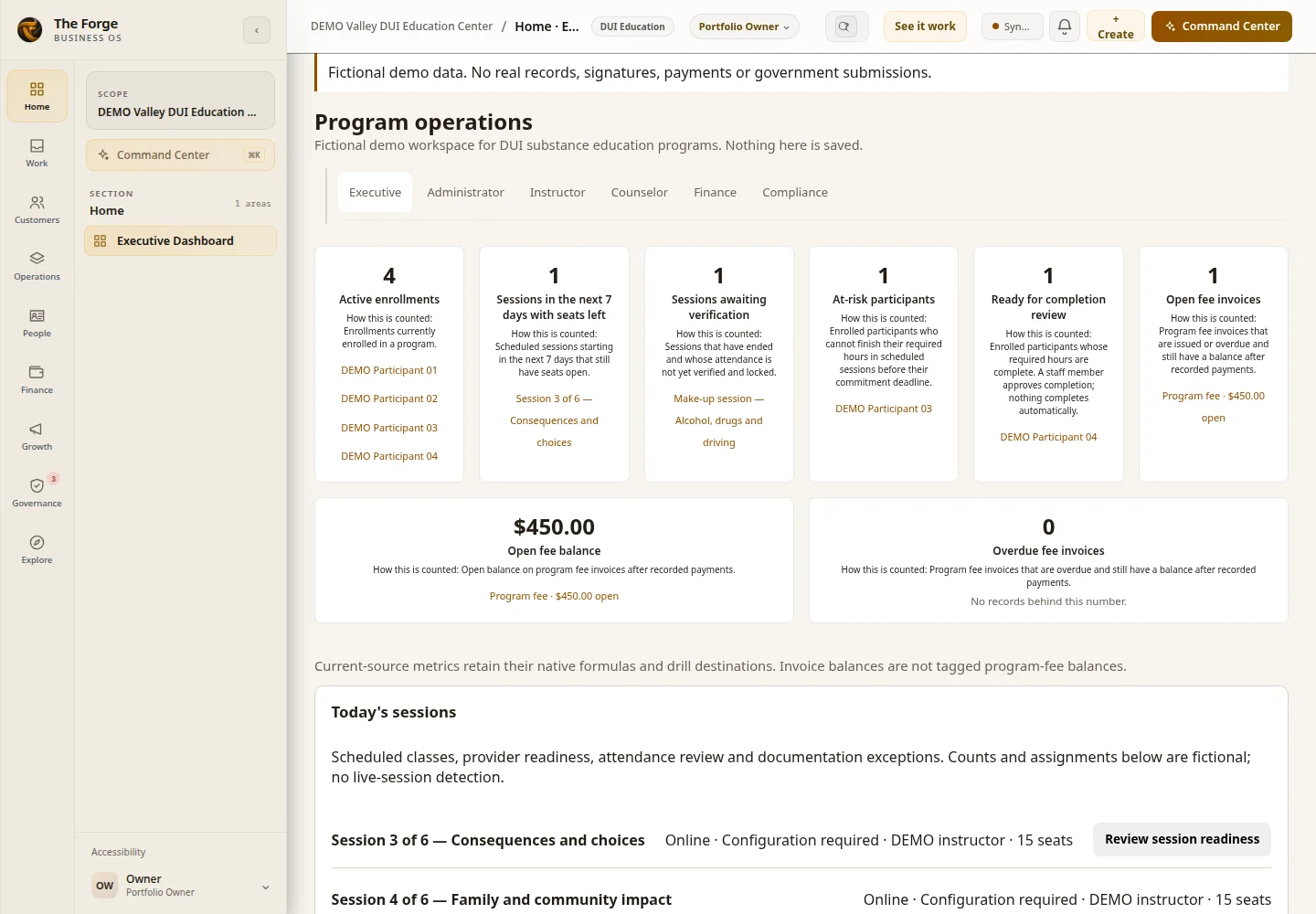
Start with the Program operations numbers for your program, each linked to the list behind it.
- CalendarIn build
Scheduled sessions by day, week, cohort or instructor. Cohorts and recurring classes are not released yet. Implementation unit P2-2.
- SessionLimited release
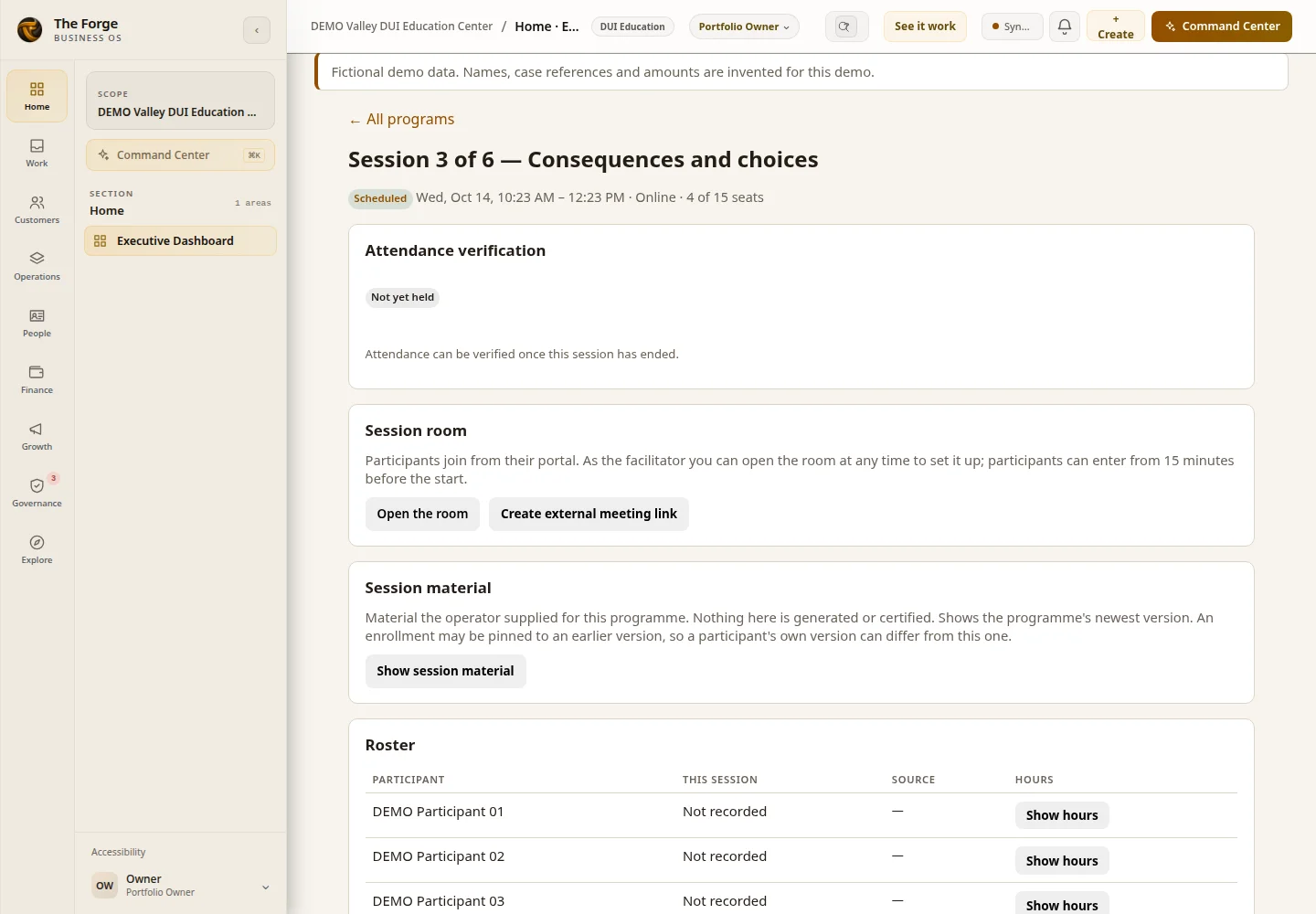
One scheduled session, with its roster, attendance entry and room access.
- RoomConfiguration required
Online sessions open a Session Room with entry rules and an access log. Live video requires LiveKit keys.
- Attendance ReviewLimited release
Staff verify a session’s attendance and lock it. Changing a locked session needs an owner or general manager and a note.
The participant lifecycle
One record from first referral to completion.
- Referral source and case referenceLimited release
Record the referral source and case reference on each enrollment.
- Court name, referral date and officer contactDesign preview
Would be recorded on each enrollment once reviewed.
- Enrollment checklistsLimited release
Enrollment checklists are available in the Forge app for each enrollment.
- DUI intake flowDesign preview
The DUI intake flow that uses those checklists is a Design preview.
- Enrollment and seatsLimited release
Enroll a participant in a program. The program’s seat cap is the smallest seat count across its scheduled sessions. Sessions without a seat count do not limit enrollment. When the program is full, the next enrollment is refused, and two requests cannot both take the last seat. A withdrawal frees a seat.
- Classes and attendanceLimited release
Record attendance for each session. Verify a session to lock it.
- Hours and completionLimited release
The hours ledger shows verified and pending minutes. A participant cannot be marked complete while required hours are outstanding.
- Provider-sourced minutesConfiguration required
Minutes from a connected Zoom account (provider reports) and from room data stay pending until staff verify and lock them, on every program. Provider reports require a connected Zoom account.
- Completion certificateDesign preview
A certificate would be issued only after an authorized person approves completion.
Role-specific experiences
Each person sees the work that is theirs. Two role workspaces are In build.
The Program operations numbers are Limited release today. The instructor and billing workspaces are In build. The other role workspaces are Design preview.
- Program director: program operationsLimited release
The Program operations section on the Command Center: active enrollments, sessions awaiting verification, at-risk participants and open invoice balances, each linked to its list.
- Program director: setup and hours reviewDesign preview
Would give the program director a workspace for program setup, enrollment and hours review. Existing program screens remain available.
- AdministratorDesign preview
Would organize new enrollments, pending reviews, sessions, scheduling conflicts and missing records.
- Enrollment coordinatorDesign preview
Would organize the intake queue for new participants.
- InstructorIn build
Will show assigned classes, rosters, attendance entry and session documentation. Implementation unit P2-1.
- Billing specialistIn build
Will work program-fee invoices, partial payments and the billing workspace that follows them. Implementation unit P3-2.
- CounselorDesign preview
Would show assigned participants, appointments and authorized signature queues. Clinical storage needs a separate scope and privacy review.
- Compliance reviewerDesign preview
Would organize reporting deadlines, missing records and audit preparation, subject to California review.
- ParticipantDesign preview
Would show a participant’s enrollments, sessions, hours and documents in the Participant Portal.
Current product evidence
Program operations in the existing product.
These captures come from the Forge app with its built-in fictional DUI demo. Fictional demo data only: deployment not verified for any customer account. They show existing product screens, not a deployed tenant or a completed regulatory workflow. The demo opens the existing session-room controls with fictional records; live video and external providers are not configured in that demonstration.
Enrollment creation is Limited release. A complete staff enrollment screen is a Design preview; the blueprint shows that intended journey.
Scheduling and attendance
Seats, sessions and attendance stay in step.
- Session roomsLimited release
Each online session opens a Session Room with participant entry rules and an access log. Room entry alone does not count toward required hours.
- Participant live videoConfiguration required
Uses LiveKit when configured. Requires LiveKit keys.
- Staff video stageDesign preview
Needs a security-policy change before it can be used.
- Zoom meeting links and attendance reportsConfiguration required
Requires a connected Zoom account. Minutes from those reports stay pending until staff verify and lock them.
- Sessions with seat countsLimited release
Each class session can have a seat count. The program’s cap is the smallest of those counts. A full program refuses the next enrollment, and a withdrawal frees a seat.
- Corrections without overwritingLimited release
A correction is a new attendance entry. The earlier entry stays readable.
- Verify and lockLimited release
Staff verify a session’s attendance and lock it. Changing a locked session needs an owner or general manager and a note.
- Instructor-recorded sessionsIn build
Instructors recording their own sessions is not released yet. Implementation unit P1-10.
- Cohorts, recurring classes and calendar viewsIn build
Will group participants into cohorts, repeat classes on a schedule, and show calendar views by day, week, cohort or instructor. Implementation units P1-7, P1-8 and P2-2.
Documentation
The documentation workflow is taking shape.
- Required documentsIn build
Will track required documents, pending signatures and overdue administrative records. Implementation unit P2-3.
- Counseling and session notesDesign preview
Templates, drafts, reviews and amendment history. Clinical records need their own protected store and legal review first.
- E-signature in The ForgeAvailable
General e-signature is available on all plans.
- E-signature for DUI intakeDesign preview
Connecting e-signature to DUI intake is a Design preview.
The Forge does not include licensed assessment content or scoring.
Financial operations
Program-fee workflows will build on Forge finance.
Program fees are planned as ordinary invoices in The Forge, using the existing accounting workflow.
Program-fee tagging, fee schedules and refunds are not released yet.
- Open invoice balancesLimited release
- Open invoices for enrolled participants appear in the Program operations numbers, with links to each invoice.
- Generic invoices and partial paymentsLimited release
- Forge invoices and partial payments are open to some plans and tenants today. They are not yet linked to program enrollments.
- Program-fee taggingIn build
- Will tag invoices as program fees so each balance matches its enrollment. Until then, some balances may not match yet. Implementation unit P3-2.
- Program-fee invoicesIn build
- Will link program-fee invoices to each enrollment through Forge finance. Each installment is an ordinary invoice. Implementation unit P3-2.
- Fee schedules and payment plansIn build
- Will support reviewed fee schedules and installment plans. Implementation units P3-1 and P3-2.
- Refunds and receiptsIn build
- Will connect refund reviews and receipts to the same financial record. Implementation unit P3-3.
Reporting
A clearer path from records to reviewed reporting.
- Hours ledgerLimited release
Shows verified and pending minutes for each participant, with the source of each entry.
- Program overview numbersLimited release
Active enrollments, sessions awaiting verification, at-risk participants and open invoice balances for enrolled participants, with links to existing records.
- Filter-matched drill listsDesign preview
Lists that match a chosen filter are a Design preview.
- Wider reportingIn build
Will extend the overview into program-level reports. Implementation unit P5-1.
- Agency report exportsDesign preview
Reports would start as exports that a person reviews and approves. Nothing would be sent to an agency automatically, and no agency integration is claimed.
California operational requirements
California requirements are being mapped. Review is pending.
We are documenting the California program rules The Forge would need to support, each with its source and effective date. A rule stays unconfirmed until a named reviewer checks it against the official source.
This blueprint does not enforce California rules. Existing record-handling defaults need separate review. No certification, state approval or government integration is claimed.
Design preview Compliance workspace and reporting calendar.
Setup and launch
Start with one program. Expand when your team is ready.
- Fit Review. Review your programs, the courts and agencies you work with, and the systems you use today.
- Set up. Configure programs, sessions, seats and staff access. Setup needs your plan, permissions and a Forge setup step, so it is Configuration required until your Fit Review confirms it.
- Train and check. Walk through a real class day with your staff before you rely on the records.
- Decide go-live. You choose which features you use on day one. Features that are In build or Design preview are not part of go-live.
Keep · Replace · Connect
Keep the systems that earn their place.
Your court, agency and accounting requirements still matter. Review where The Forge keeps the program record and where another system keeps the official record.
Keep what works. Replace what does not. Connect the rest through The Forge.
Check current connector availability ↗- Court and agency reporting forms
- Your accounting software
- Your payment processor
- Your video meeting provider, for session links
These are systems to discuss in your Fit Review, not a list of verified ready-to-connect integrations. Setup and provider support vary.
Make it fit your program
Bring one class, one fee question or one hours problem.
Review plans and current pricing before choosing. Features depend on plan, configuration, permissions and current availability.
Can we keep the systems we already use?
Keep what works. Replace what does not. Connect the rest through The Forge. Review current connector availability and your industry requirements in a Forge Fit Review.
How do we choose the right starting plan?
Bring a real business handoff and the systems your team uses to a free Forge Fit Review. Check current pricing, plan features and availability before choosing a configuration.
Evaluate the fit
The program blueprint, when you need the detail.
Review the detailed requirements, configuration and roadmap with your team. Not every described workflow is available today. Plan, provider and rollout limits apply; check current availability before relying on a feature.
Optional deep diveDetailed industry blueprint
Roles, workflows, requirements and launch considerations for your team to review.
The business and its requirements
A program runs on attendance. Each class needs a roster, each absence needs a record, and each participant's verified hours decide when they finish. The Forge keeps those records together, so the program team and the instructors work from the same numbers.
How does a DUI education program keep attendance and hours in one place?
Each program has its required hours and a schedule of sessions with seat counts. Participants enroll against a referral and a case reference. Attendance is kept as an entry that can be corrected but never overwritten. Staff verify a session and lock it. Completion stays with a person, who reviews the hours before anyone is marked complete.
Management questions to review
Active enrollments
How many participants are enrolled right now, by program.
Sessions awaiting verification
Which sessions still need staff to verify attendance before hours count.
At-risk participants
Participants whose remaining hours may not fit before their due date. Shown in the Program operations section.
Open invoice balances for enrolled participants
Open invoices for enrolled participants, with links to each invoice. Program-fee tagging is In build, and some matches may be missing.
Signs you're outgrowing your current setup
- A class roster is reconstructed from a sign-in sheet after the session ends
- Two staff members give a participant different counts of hours completed
- A session is over capacity, and the room learns it at the door
- A participant is marked complete before the hours were verified
- Program-fee balances live in a notebook only one person can read
Other places this industry loses time and margin
Attendance lives on sign-in sheets that do not match the hours
Attendance is recorded against each session. A correction is added as a new entry, and the original stays visible, so a changed figure cannot quietly replace the first one.
Classes are overbooked, and nobody notices until the room is full
Sessions can have a seat count. A program's cap is the smallest seat count across its scheduled sessions. When it is full, the next enrollment is refused with a clear message.
A participant falls behind on hours and the deadline arrives first
The hours ledger shows what each participant has completed and what is still owed. The Program operations section on the Forge dashboard lists at-risk participants, each linked to its record.
Program fees are chased by memory, and partial payments get lost
Program-fee workflows will use existing invoices. Partial payments on generic invoices are limited release today. The program-fee workflow that records them against the balance is in build (P3-2), so the next follow-up will start from the right amount.
Workflow and automation details
Example workflows
- 1
Enroll against a referral
Record the referral source and case reference on the participant's enrollment. A session with no seats left refuses the enrollment with a clear reason.
- 2
Record and verify attendance
Staff record attendance for each session. When the session is verified, its attendance locks, and any later change needs an owner or manager and a note explaining it.
- 3
Review hours before completion
The hours ledger shows verified and pending minutes separately. A participant cannot be marked complete while required hours are outstanding.
- 4
Invoice the program fee
The intended program-fee workflow will link program-fee invoices to enrollments through Forge finance. It is In build. Generic invoices and partial payments are Limited release, and the current summary includes open invoices for enrolled participants and may miss some matches.
What may be replaced, and what stays
What The Forge may replace
Tools and manual processes that may no longer be necessary.
- Paper sign-in sheets and attendance logs
- Hand-kept hours spreadsheets
- A notebook of program fee balances
What The Forge may integrate with
Systems you keep — The Forge becomes the layer above them.
- Court and agency reporting requirements, reviewed by your team
- Your accounting software
What this looks like in a real week
Illustrative scenario: a participant close to finishing
A participant is close to finishing a program but is missing two sessions. The owner sees the remaining hours on the enrollment, checks which sessions still have seats, and confirms the next date before the deadline. Nothing is marked complete until the hours are verified and a person reviews the record.