
The Forge for distribution
The order promise starts with knowing what is on hand.
Sales needs a delivery answer. The warehouse needs a reliable stock record. Bring customer work, inventory and purchasing records into the same conversation.

Follow the movement behind the stock count.
Record what came in and what was used.
Read the balance built from recorded movements.
Review a suggestion and decide what to buy.
A per-item ledger of receipts, usage, adjustments and counts drives current stock. The ordering estimator explains its usage rate, window and math; it never places an order automatically.
Keep · Replace · Connect
Keep the systems that earn their place.
Keep the warehouse, accounting or order systems your business still needs. Confirm the handoffs and source records before promising automatic synchronization.
Keep what works. Replace what does not. Connect the rest through The Forge.
Check current connector availability ↗- Warehouse and inventory management systems
- Accounting and receivables software
- EDI and B2B ordering platforms
- Freight and logistics/carrier systems
- Vendor purchasing and procurement platforms
- Payroll and workforce systems for warehouse and delivery staff
These are systems to discuss in your Fit Review, not a list of verified ready-to-connect integrations. Setup and provider support vary.
Connect the customer question to the next stock decision.
A workflow to review for your business. Expand a step for its purpose and current availability.
Read the customer request
Keep customers, deals and other business records within your business workspace.
Business records (CRM)Available
Check recorded inventory
Review stock movements and counts. A recorded balance still depends on accurate receipts, usage and adjustments.
Physical inventory tracking & usage-based ordering estimatorAvailable
Review the quote
Track the quote or estimate linked to a lead or job, with its own status.
Native estimates & quotesAvailable
Review the commercial handoff before committing.
This provided estimates sample illustrates quoting in The Forge. It does not depict warehouse stock, delivery promises or a completed fulfillment process; a verified inventory capture is still needed.
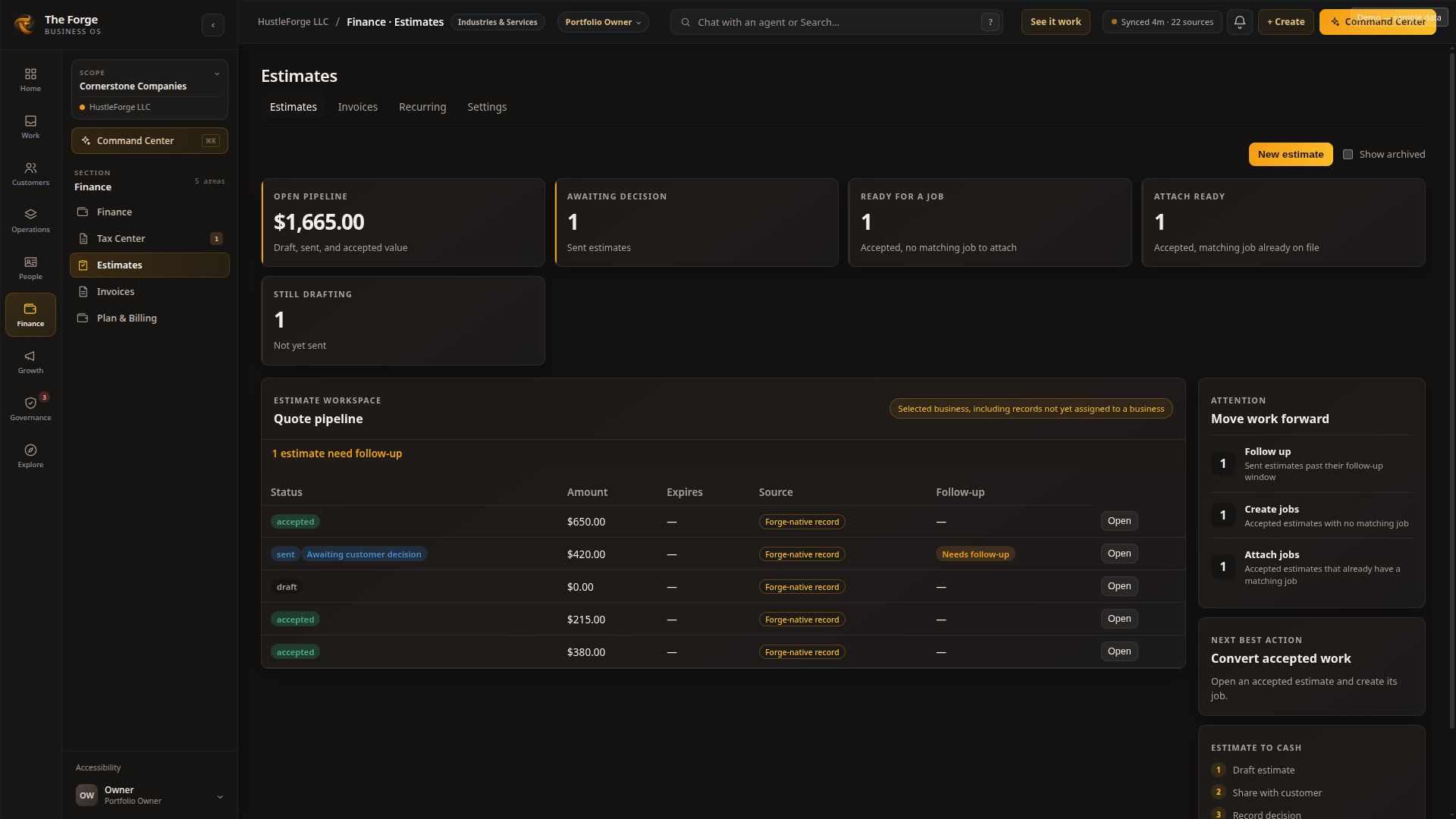
Shows estimates and job actions only, not an inventory or warehouse screen. Completed ordering and fulfillment are not shown by this sample.
View the original sample screen ↗Start with the work you need to connect.
Bring one job, customer question or repeated admin task. We’ll review who handles it, which tools you use and what The Forge can help you keep, replace or connect.
Review plans and current pricing before choosing. Features depend on plan, configuration, permissions and current availability.
Forge Pro
$799/moBroader coverage — several teams and locations connected, with approvals you control and a quarterly review to keep improving how you run.
A starting point for your Fit Review. Check the plan’s current features, provider requirements and rollout status against the work you need to do; an industry recommendation does not guarantee that every described workflow is available.
- Up to three locations, thirty operator users
- Unlimited view-only users
- Everything in Core
- Advanced workforce, scheduling, and capacity planning
- Advanced payroll and wage-summary visibility
- Role-specific dashboards and advanced reporting
- Thirty workflows, eight integrations, and API access
- Reviews and reputation from your connected Google Business Profile
- Prospecting audit reports, social publishing, and in-composer image generation
- A daily deck of 20 ready-to-post marketing ideas
- Configurable business-process approvals and advanced permissions
- Priority support and quarterly optimization review
Commonly added
- Advanced integrations
- Advanced reporting
- Additional location
Every plan launches Guided or Managed — see plan and launch-path details for the full comparison.
Can we keep the systems we already use?
Keep what works. Replace what does not. Connect the rest through The Forge. Review current connector availability and your industry requirements in a Forge Fit Review.
What does this product example demonstrate?
Generic Forge estimates sample · sample data. Not an inventory or warehouse screen. Shows estimates and job actions only, not an inventory or warehouse screen. Completed ordering and fulfillment are not shown by this sample.
How do we choose the right starting plan?
Bring a real business handoff and the systems your team uses to a free Forge Fit Review. Check current pricing, plan features and availability before choosing a configuration.
Purchasing and fulfillment requirements
Look beyond the first order.
Review the detailed requirements, configuration and roadmap with your team. Not every described workflow is available today. Plan, provider and rollout limits apply; check current availability before relying on a feature.
Optional deep diveDetailed industry requirements
Roles, workflows, requirements and launch considerations for your team to review.
The business and its requirements
Sales needs a delivery answer while the warehouse waits on a supplier. The Forge connects orders, inventory and purchasing records so customer commitments do not depend on three different spreadsheets agreeing. Follow purchasing, receiving and customer orders together. Give sales and warehouse teams a shared starting point for backorders, stock questions and the next supplier decision.
How can wholesale distributors get better visibility into inventory, orders, and receivables without replacing their warehouse system?
The Forge connects around your warehouse or inventory system — customer accounts, sales orders, price-book tiers, credit status, and vendor purchase orders all live on one record. Backorders trigger customer notification automatically, credit holds are visible before a shipment is picked, vendor rebate thresholds are tracked instead of missed, and ownership sees sales-by-rep, fill rate, and receivables aging without assembling a report by hand.
Management questions to review
Sales performance by rep and territory
Order volume, revenue, and margin by sales rep, territory, and account, updated as orders close.
Fill rate and backorder aging
The percentage of order lines shipped complete versus backordered, and how long open backorders have been outstanding.
Inventory position by warehouse
On-hand, allocated, and available quantity by SKU and location, with reorder points surfaced before a stockout.
Receivables aging
Open invoice balances by account and age bucket, with accounts approaching or past credit terms flagged.
Margin by product line
Realized margin against list and contract pricing, by product category and customer segment.
Vendor rebate status
Purchase volume against rebate-eligible vendors, tracked toward earned thresholds and claim deadlines.
Plan requirements to discuss
Forge Pro
$799/moBroader coverage — several teams and locations connected, with approvals you control and a quarterly review to keep improving how you run.
Distribution runs on a mix of outside sales reps, warehouse staff, and order-desk personnel who each need to see their own role and territory, not one flat shared view — which takes workforce and scheduling information beyond a basic account record. Forge Pro adds employee and contractor management, role-based dashboards, and advanced reporting on top of the platform's foundation, matching how a multi-warehouse or multi-rep distributor needs to see fill rate, receivables, and vendor rebate status without assembling it by hand.
- Up to three locations, thirty operator users
- Unlimited view-only users
- Everything in Core
- Advanced workforce, scheduling, and capacity planning
- Advanced payroll and wage-summary visibility
- Role-specific dashboards and advanced reporting
- Thirty workflows, eight integrations, and API access
- Reviews and reputation from your connected Google Business Profile
- Prospecting audit reports, social publishing, and in-composer image generation
- A daily deck of 20 ready-to-post marketing ideas
- Configurable business-process approvals and advanced permissions
- Priority support and quarterly optimization review
Commonly added
- Advanced integrations
- Advanced reporting
- Additional location
Every plan launches Guided or Managed — see plan and launch-path details for the full comparison.
Speaking the language of this industry
Signs you're outgrowing your current setup
- A customer calls asking where their order is because no one told them it was backordered
- An order desk rep has to call a warehouse supervisor to check whether an item is actually in stock
- A shipment goes out to an account that was already 60 days past terms
- The price a customer was quoted does not match what shows up on the invoice
- A vendor rebate deadline passes because no one was tracking the purchase volume against it
- The owner asks 'how did we do by rep last month' and waits three days for a spreadsheet
- Two warehouses both think the other one has stock on hand for a large order
- A sales rep leaves and the replacement has no record of the account's ordering pattern or pricing history
- Customer service tells a caller they'll 'check and call back' because order status lives in a different system
Other places this industry loses time and margin
Sales reps keep their own account and pricing notes outside the system
Every account, contact, price tier, and order history lives on the shared customer record, so a rep's territory knowledge does not disappear into a personal notebook or spreadsheet.
See how The Forge fixes software fragmentation →Backordered items are not communicated to the customer until they ask
A line item that goes on backorder triggers an automatic customer notification with an expected fulfillment date, instead of the customer finding out when the shipment arrives short.
See how The Forge fixes customer communication →Price-book tiers get applied incorrectly at order entry
Customer accounts carry their assigned price tier and contract pricing, so order entry pulls the correct price automatically instead of relying on the order-desk rep to remember or look it up.
See how The Forge fixes profitability visibility →Vendor rebates are earned but never claimed because no one is tracking the threshold
Purchase volume against rebate-eligible vendors is tracked toward the earned threshold, and an approaching or crossed threshold is flagged for the purchasing team to file the claim.
See how The Forge fixes profitability visibility →A shipment goes out to a customer who is already on credit hold
Credit status is visible on the customer record and checked at order confirmation, so an account past its credit limit or terms is flagged before the order is picked, not after it ships.
See how The Forge fixes work falling through cracks →Inventory visibility across multiple warehouses is inconsistent
Stock levels, allocated quantity, and reorder points are visible by warehouse and in aggregate, so an order can be filled from the right location instead of assumed available at the nearest one.
See how The Forge fixes multi location operations →Sales-by-rep, fill-rate, and margin reports are assembled by hand each month
Sales, fulfillment, and margin data roll up automatically by rep, territory, and product line, so the monthly reporting cycle stops being a manual spreadsheet exercise.
See how The Forge fixes manual reporting →Order status is invisible to the customer-service desk when a customer calls
Order status — confirmed, picking, backordered, shipped, delivered — is visible on the account record, so a customer-service rep can answer a status question without transferring the call to the warehouse.
See how The Forge fixes customer communication →A departing sales rep takes account relationships and history with them
Account history, order patterns, pricing agreements, and communication logs live on the customer record, not in the rep's personal files, so territory handoff does not start from zero.
See how The Forge fixes work falling through cracks →Information to review for this workflow
Customer account
A B2B buyer, carrying contact history, assigned price tier or contract pricing, credit terms and limit, and order history.
Sales order
A customer order in progress, tracking line items, pricing, fulfillment status, and any backordered lines through to shipment and invoicing.
Purchase order
An order placed with a vendor, tracking expected lead time, quantities, landed cost, and receipt status against a specific warehouse.
Inventory item (SKU)
A stocked product, carrying on-hand, allocated, and available quantity by warehouse, reorder point, and unit-of-measure conversions.
Warehouse / location
A physical stocking location tracked independently for inventory, fulfillment, and reporting purposes in a multi-warehouse operation.
Vendor
A supplier record carrying lead times, standard costs, open purchase orders, and rebate-program terms.
Price tier / contract
A pricing agreement — standard tier or customer-specific contract — that determines the price applied to a given account at order entry.
Invoice
A billed amount generated from a shipped order against the customer's terms, feeding receivables aging and collection workflows.
Workflow and automation details
Example workflows
- 1
Purchase order to received inventory
A reorder point or manual request generates a purchase order to a vendor, tracks expected lead time, and receives inventory into the correct warehouse — updating available stock and any backorders it can now fulfill.
- 2
Order intake to fulfillment
An order — from a rep, phone, email, or EDI feed — is captured on the customer account, priced against the correct tier, checked against credit status, and routed to the warehouse for picking, packing, and shipping.
- 3
Backorder to resolution
A short-shipped or unavailable line item is flagged as a backorder, a customer notice with an expected date is queued (it sends once an email or SMS provider is connected), and the item is automatically released for shipment once inventory is received.
- 4
Invoice to receivables collection
A shipped order generates an invoice tied to the account's terms, ages into the receivables pipeline, and triggers a follow-up sequence as it approaches and passes its due date.
Automation ideas to confirm before use
- 1
Backorder-fulfilled release
When inventory is received against a SKU with open backorders, affected orders are automatically flagged for release and a customer notice of the updated ship date is queued (it sends once an email or SMS provider is connected).
- 2
Credit-hold alert at order confirmation
An order placed against an account past its credit limit or terms is flagged before it reaches the warehouse for picking, routing to the AR manager for a hold/release decision.
- 3
Reorder-point trigger
A SKU's available quantity crossing its defined reorder point generates a draft purchase order to the assigned vendor for purchasing review, rather than waiting for a stockout to be noticed.
- 4
Rebate-threshold notification
Purchase volume with a rebate-eligible vendor approaching or crossing its threshold notifies purchasing to prepare and file the claim before the program deadline.
- 5
Price-tier mismatch flag
An order entered at a price other than the account's assigned tier or contract rate is flagged for review before the order is confirmed, catching manual entry errors before they ship.
- 6
Receivables aging escalation
An invoice crossing a defined age threshold past due enters a structured follow-up sequence, escalating to the AR manager if it remains unresolved.
Proposed views to review
Sales Rep Performance Board
Order volume, revenue, and margin by sales rep and territory, so sales management can see performance without waiting on a monthly rollup.
- Orders and revenue by rep
- Margin by rep and product line
- Account count and order frequency
- Territory comparison
Inventory & Fulfillment Board
Stock position and order-fulfillment performance across every warehouse, surfaced together instead of in separate systems.
- Fill rate by warehouse
- Open backorders and aging
- SKUs at or below reorder point
- Inventory turns by product category
Receivables & Credit Board
Open receivables and account credit standing, so collections and credit decisions happen before an account becomes a write-off risk.
- Aging by bucket
- Accounts on credit hold
- Days sales outstanding
- Collection follow-up status
Vendor & Rebate Board
Purchasing performance and rebate-program status by vendor, so earned rebates are claimed instead of expiring unnoticed.
- Purchase volume by vendor
- Rebate threshold progress
- Average vendor lead time
- Landed cost trend by product line
Who can see and do what
Outside Sales Rep
- Views assigned accounts, territory, and order history
- Places and edits orders for accounts within their territory only
- Sees pricing tiers for their own accounts, not company-wide margin data
- Cannot view other reps' accounts or override credit holds
Order Desk / Customer Service
- Views order status, inventory availability, and backorder status across all accounts
- Enters and modifies orders company-wide
- Sees credit-hold status but cannot release a hold without authorization
- Cannot view vendor cost data or rebate terms
Warehouse / Inventory Manager
- Views inventory position, reorder points, and receiving activity across assigned warehouse(s)
- Manages receiving, put-away, and fulfillment status updates
- Sees allocated versus available stock company-wide for sourcing decisions
- Cannot view customer pricing or account credit terms
AR / Credit Manager
- Views receivables aging, credit limits, and payment history across all accounts
- Places and releases credit holds
- Manages collection follow-up workflows
- Cannot edit order pricing or inventory records
Purchasing Manager
- Views vendor terms, lead times, standard costs, and rebate-program status
- Creates and manages purchase orders across all warehouses
- Sees landed-cost and margin data by product line
- Cannot view customer-specific contract pricing
Owner / General Manager
- Views company-wide sales, inventory, receivables, and margin data across all warehouses and reps
- Configures role-based visibility and credit-hold authorization thresholds
- Sees vendor rebate and purchasing performance alongside sales performance
What this industry has to stay ahead of
- Sales-tax nexus and collection obligations across every state a distributor ships into, which shift as delivery volume grows in a new state
- Lot and serial traceability for product-liability exposure and recall response, especially for regulated or safety-relevant product lines
- Resale-certificate and tax-exemption documentation on file for exempt customer accounts, in case of an audit
- DOT and hazmat handling and documentation requirements for distributors moving regulated materials
- Vendor contract and rebate-program compliance, including accurate reporting of purchase volume used to calculate earned rebates
- Weights-and-measures accuracy for any product sold by weight, volume, or count subject to state inspection
- Data-retention requirements for purchase, sale, and shipment records tied to warranty or liability claims
What may be replaced, and what stays
What The Forge may replace
Tools and manual processes that may no longer be necessary.
- Spreadsheet-based price books and account trackers
- Manual backorder-tracking lists
- Rep notebooks and personal customer files
- Email threads used to check order or credit status
- Manually assembled sales-by-rep reporting
- Disconnected reorder-point tracking
What The Forge may integrate with
Systems you keep — The Forge becomes the layer above them.
- Your warehouse/inventory management system
- Your accounting and receivables platform
- Your EDI or B2B ordering platform
- Your freight and carrier systems
Illustrative week — not customer results
An 18-person industrial-supply distributor running two warehouses
Illustrative example, not a demonstrated automatic workflow or customer result. A long-standing contractor account submits a 40-line order by email on Monday morning, mixing items stocked at both warehouses. The order desk enters it against the account's contract pricing tier — pulled automatically rather than looked up — and the system checks the account's credit status before confirming. Three line items are unavailable at the primary warehouse but in stock at the second; the order splits automatically and both shipments are scheduled. Two items are genuinely out of stock across both locations — they go on backorder, and an automatic notice with an expected date is queued for the customer (it sends once an email or SMS provider is connected) rather than finding out when the box arrives short. Later that week, inventory is received against a standing purchase order with that vendor, and the backordered items release for shipment the same day. Meanwhile, purchase volume with that same vendor crosses a quarterly rebate threshold, and purchasing is flagged to file the claim before the deadline. On Monday morning, the sales manager opens one view: fill rate by warehouse, this month's sales by rep against last month, three accounts approaching their credit limit, and $6,200 in a rebate now ready to claim — none of it assembled by hand.
Proposed launch stages — agree scope and timing
Customer, pricing, and vendor migration
1-2 weeksExisting customer accounts, price tiers or contract pricing, vendor records, and open orders are migrated so the operation starts with a complete record instead of a blank system.
Inventory and warehouse configuration
1-2 weeksWarehouse locations, reorder points, and unit-of-measure conversions are configured, and the connection to the existing warehouse/inventory system is validated.
Order-workflow and credit-rule configuration
1-2 weeksOrder-intake channels (rep, phone, email, EDI), backorder notification rules, and credit-hold thresholds are configured to match how the business actually operates.
Integration connections
1 weekAccounting/receivables, EDI, and freight/carrier systems the business keeps are connected so orders, invoices, and shipments flow without re-entry.
Training and go-live
1 weekSales reps, order desk, warehouse staff, and AR are trained on their role-specific views before the business cuts over from prior tools.
Typical timeline for a business of this profile — not a contractual commitment. Actual duration depends on data readiness, integration count, and whether you choose Guided or Managed Launch.
Where this typically goes next
Where distributors typically grow next inside The Forge
- 1Add a second warehouse or additional operating location, moving toward Forge Operations for cross-location reporting and permissions
- 2Layer on advanced reporting for deeper margin and vendor-rebate breakdowns as product-line complexity grows
- 3Add advanced integrations for EDI trading partners or industry-specific procurement systems beyond the standard set
- 4Expand communication capacity for backorder and delivery notifications as order volume grows
- 5Adopt priority support once fulfillment-cycle uptime becomes business-critical
Explore by the problem you feel most
Customer communication is fragmented
One customer texts the owner, emails the office, and calls the tech — and none of those threads sit in the same place. The next person to pick up the conversation has no idea what was already said.
ExploreWe do not know what is profitable
Revenue comes in. Expenses go out. But nobody can say which jobs, services, clients, or crews actually make money — and which ones quietly lose it.
ExploreEach location runs differently
Every office, branch, or practice has its own way of doing things — different processes, different tools, different reporting. Nobody at the top can compare them or enforce a standard.
ExploreReports take hours to build
Every week someone exports data from three to five systems, pastes it into the same spreadsheet, fixes the column headers, and presents numbers that are already stale by the time the meeting starts.
ExploreWork falls through the cracks
A job is sold, then it depends on someone remembering to hand it off, order the parts, and schedule the crew. When one step is missed, the work stalls and nobody notices until the customer calls.
ExploreDistribution — questions
Bring the order that needs three spreadsheets to answer.
Ask about distribution
Ask The Forge is an AI assistant. Answers are generated from published Forge information and may be incomplete. Do not submit confidential, regulated, or customer-specific information.