
Your quote is out. Keep the next conversation moving.
A customer has the estimate, but the office cannot tell who is making the next call.
Explore the workflow and its current limitations.

Bring the bid, crew plan, change orders and job costs into one project record. Follow what was agreed, what was spent and what still needs billing.
From the first estimate to the final draw. One clearer handoff between the office and the field.
A workflow to review for your business. Each step shows its purpose and current availability.
An estimate becomes a tracked bid with a stage and an owner. Follow-up can be queued while the bid is open, and the outcome is recorded.
Construction bid intelligence (Level 1: trustworthy bid history), Estimate follow-up policyLimited release
Jobs carry status, assignment and schedule. A crew member cannot be assigned to two overlapping open jobs; the assignment is refused and names the conflict.
Crew double-booking refused at job assignmentLimited release
Compare each cost code with its budget. Closed time, job-linked purchasing and inventory post against the job as they are recorded.
Job budgets by cost code (budget vs actual, variance)Limited release
A change order is priced and routed for owner or architect acknowledgment. Until it is acknowledged, it does not change the billed total.
Owner and architect acknowledgment of change ordersLimited release
Track insurance, license, lien-waiver and W-9 expiry dates. Subcontractors submit certificates through a single-use sign-in link, and nothing counts until you accept it.
Subcontractor portal (scoped sign-in)Limited release
A draw is checked against logged field progress before submission. At substantial completion, retainage is flagged for release, and verified punch-list items clear the final draw.
Draw check against field progress, Retainage release flags at substantial completion, Punch list & closeout gateLimited release
Reading the labels. Each label is derived from the platform registry. Available: in general release on the plan shown. Limited release: released to selected customers on that plan; confirm it in your Fit Review before you plan around it. Configuration required: the code is present and the setting named beside it must be set for your account. Design preview: not released, shown with fictional data.
Product designs on this page are drafts and may change before release.
| View | What it answers | Status |
|---|---|---|
| Job budgets | Actual against budget by cost code, with unassigned cost shown separately. | Limited release |
| Daily labor cost | Which jobs are running over budget today. | Limited release |
| Draws and retainage | What is billed, what is flagged, and what retainage is eligible for release. | Limited release |
| Subcontractor compliance | Which required documents have expired or are close to expiry. | Limited release |
| Bid pipeline | Open bids, outcomes and conversion by estimator, client and project type once there is enough reviewed history. Win rate shows once at least five estimates are decided. | Limited release |
| Schedule board | Crew conflicts, subcontractor overlaps and slack in days. | Limited release |
Fictional demo data. The panels below show the construction home for the fictional business DEMO Ridgeline Builders LLC. Not every panel is released yet; each row shows its current availability label.
Materials arrive. Crew hours add up. Extra work changes the plan. Compare the recorded costs with the budget while there is still work ahead.
Job budgets by cost code (budget vs actual, variance)
Each job can carry a budget broken down by cost code. Budget versus actual is calculated for each code on every read, with variance, percent used and an over-budget flag, and it shows unassigned cost on its own line. Budget changes are saved as numbered revisions, so earlier budgets are never overwritten.
Limited release. The comparison depends on costs being recorded and assigned correctly; it is not a substitute for your accounting records. Projected cost at completion appears only when every cost code has a budget-to-complete.
Labor + materials + subcontractors. Ask what changed before deciding what to do next.
Open bids are listed by stage with their value, so you can see what is still being priced and what has gone out. Use the example to discuss your own bid-to-job process. Bid tracking: Limited release.
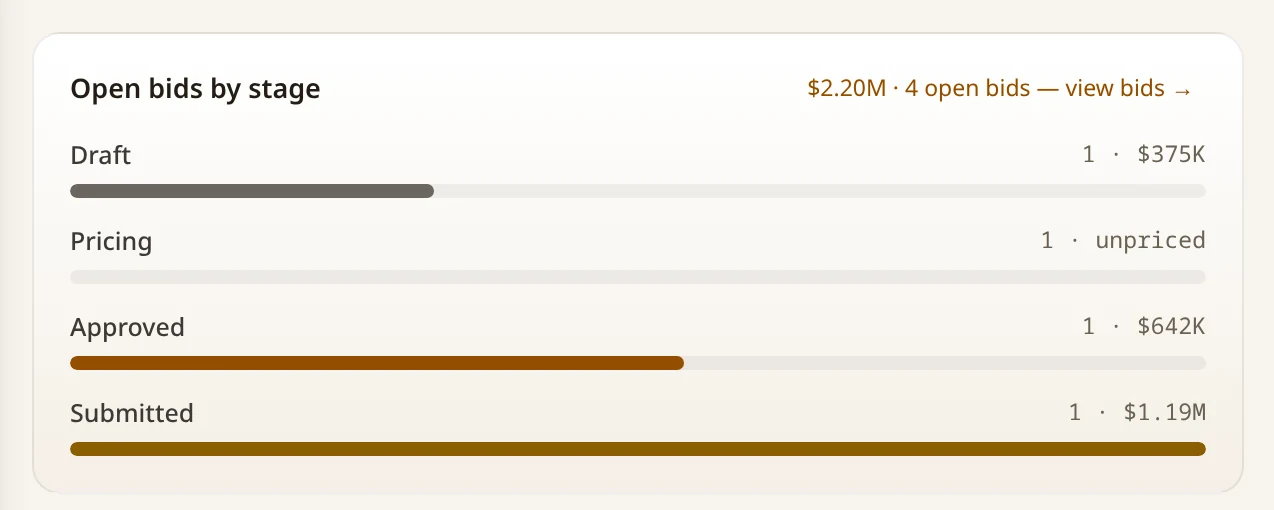
Shows open bids by stage and value only. It does not show a bid's pricing detail, win rate, change orders, draws, retainage or job costs, and it does not show a completed construction operation.
View the original sample screen ↗Your approved estimating, accounting and compliance systems still matter. Review where The Forge handles the job record and where a specialist system keeps the official record.
Keep what works. Replace what does not. Connect the rest through The Forge.
Check current connector availability ↗These are systems to discuss in your Fit Review, not a list of verified ready-to-connect integrations. Setup and provider support vary.
Bring one job, customer question or repeated admin task. We’ll review who handles it, which tools you use and what The Forge can help you keep, replace or connect.
Review plans and current pricing before choosing. Features depend on plan, configuration, permissions and current availability.
A starting point for your Fit Review. Check the plan’s current features, provider requirements and rollout status against the work you need to do; an industry recommendation does not guarantee that every described workflow is available.
Read the full industry requirements and plan recommendation ↗Keep what works. Replace what does not. Connect the rest through The Forge. Review current connector availability and your industry requirements in a Forge Fit Review.
Local demo capture · sample data. A fictional demo contractor, not a live construction business. Shows open bids by stage and value only. It does not show a bid's pricing detail, win rate, change orders, draws, retainage or job costs, and it does not show a completed construction operation.
Bring a real business handoff and the systems your team uses to a free Forge Fit Review. Check current pricing, plan features and availability before choosing a configuration.
Ask about construction
Ask The Forge is an AI assistant. Answers are generated from published Forge information and may be incomplete. Do not submit confidential, regulated, or customer-specific information.
No. The Forge does not replace estimating software, and it does not measure quantities from drawings automatically. It runs the bid tracking, subcontractor compliance, change orders, billing and job costing around the estimating software you already use.
Subcontractors sign in through a single-use invite link. They see only their own engagement, the project it is on (name and status), and their own compliance documents with the expiry window of each. They do not see other subcontractors' pricing or the owner's contract terms. A subcontractor schedule and draw amounts are not included in the portal today.
The Forge drafts a certified-payroll report by project and week from your own time entries, with a WH-347-column CSV or printable export. It is a draft for review. It is not a certified report, it is not checked against agency rules, and filing stays with your payroll administrator and compliance process. You enter the wage rates and classifications.
Retainage is tracked per project. When the project's substantial-completion date passes, its paid retainage is flagged as eligible for release and a draft release invoice is created for review. Nothing is sent or charged until an Owner, General Manager or Finance approves it. The Forge does not determine which retainage statute applies in your jurisdiction.
Your Fit Review confirms which active projects, subcontractor lists and compliance documents to load. Loading records is part of setup, not a self-serve import.
Role names follow the platform’s construction roles. Confirm the role mapping for your team in your Fit Review.
Typical duration: 2-3 weeks
Your Fit Review confirms which active projects, subcontractor lists, current compliance documents and open change orders to load. Loading records is part of setup.
Typical duration: 1-2 weeks
Draw structure, change-order routing, retainage terms and document expiry rules are set to match how your contracts run.
Typical duration: 1-2 weeks
Each estimating, accounting and payroll system you keep is confirmed in your Fit Review. Where no connector exists, records are entered or exported by hand.
Typical duration: 1 week
Operations staff, Finance users and the owner are trained on their role before the firm cuts over from prior tracking methods.
Durations are planning estimates. Your Fit Review confirms the scope before a launch date is set.
Review the detailed requirements, configuration and roadmap with your team. Not every described workflow is available today. Plan, provider and rollout limits apply; check current availability before relying on a feature.
Roles, workflows, requirements and launch considerations for your team to review.
A signed bid is only the start. Materials, crew hours, subcontractors and scope changes all affect what is left when you get paid. The Forge connects the project's bid, cost records and billing trail so the office and jobsite can work from the same job history. Bring the bid, crew plan, change orders and job costs into one project record. Follow what was agreed, what was spent and what still needs billing without rebuilding the story at closeout.
How can general contractors and specialty subcontractors get real-time job-cost visibility and stop losing margin to untracked change orders?
The Forge keeps each project's schedule of values, subcontractor compliance documents, change orders, draw requests and job budgets in one record. A change order counts toward the billed total only after it is acknowledged. Draw requests are checked against logged field progress, subcontractor document expiry dates are tracked, and owners can see job costs against budget and retainage across projects without waiting for the month-end close.
Job cost versus budget
Actual cost against each job's budget by cost code, with variance, percent used and unassigned cost on its own line. Projected cost at completion appears only when every cost code has a budget-to-complete.
Daily labor cost
Each morning, owners, general managers and finance see a labor-cost digest in the app: hours and cost for each job against its budget, and the most over-budget jobs.
Bid pipeline and win rate
Open bids by value and stage, and conversion by estimator, client and project type once there is enough reviewed history. Win rate shows once at least five estimates are decided.
Subcontractor compliance status
Which required documents have expired, which fall within the 30, 60 or 90 day window, and which subcontractor submissions are waiting for review.
Draws and billing
Draw requests by status, draws flagged against field progress, and draws paid.
Retainage outstanding
Paid retainage held per project, flagged once the project passes its substantial-completion date.
Change orders awaiting acknowledgment
Change orders that have been sent but not yet acknowledged by the owner or architect, by project.
Broader coverage — several teams and locations connected, with approvals you control and a quarterly review to keep improving how you run.
Contractors running several concurrent projects need workforce and scheduling data — crew assignments, subcontractor role-scoping, field-progress logging — layered on top of the client and project record, which is exactly what Forge Pro adds over Core. The role-based dashboards and advanced reporting in Pro also match how job costing and subcontractor compliance need to be seen in real time, by project and by trade, rather than assembled after the fact.
Commonly added
Every plan launches Guided or Managed — see plan and launch-path details for the full comparison.
Bids go out and no one tracks whether they convert to a signed contract
Every submitted bid is a tracked record with an owner and an outcome. Estimate follow-up can queue a reminder once a bid has gone quiet for the delay you set. The reminder is queued, not sent by The Forge on its own.
Job costs are not visible until the month-end close, after the budget is already blown
Closed time, job-linked purchase orders, inventory movements and equipment allocations roll into each job's cost-code budget as they are recorded, so budget against actual is visible while there is still time to act. Costs with no code stay on an Unassigned line. Labor and purchasing use the job's default cost code until per-entry coding is added.
Subcontractor insurance certificates and lien waivers expire without anyone noticing
Each subcontractor's required documents carry an expiry date. When a document enters the 30, 60 or 90 day window, or lapses, the office gets an alert. The subcontractor gets an email notice from a connected email sender; without one, the notice stays queued and is not shown as sent.
Change orders are agreed verbally on site and the paper trail never catches up to the invoice
A change order is logged against the project when it is requested and routed to the owner or architect for acknowledgment. Until it is acknowledged, it does not change the project's billed total.
Draw requests are submitted without matching real percent-complete in the field
Each draw line is checked against the progress logged in the field. A claimed percent complete above the latest logged value, beyond your tolerance, is flagged before submission. A flagged draw can be submitted only with a recorded reason from an Owner or General Manager.
Running six projects at once means the schedule lives in the PM's head, not a system anyone else can see
Active dated jobs appear on one schedule board across your companies. Overlapping crew assignments show as conflicts, subcontractor bookings show on their own lane, and finish-to-start chains show slack in days. Milestones are not on the board yet.
Retainage held across a dozen projects is never reconciled until the year-end audit
When a project's substantial-completion date passes, its paid retainage is flagged as eligible for release and a draft release invoice is created for review. Nothing is sent or charged until an approver acts.
Punch-list items get fixed in the field but never marked closed, so final payment stalls
Punch-list items are tracked from identification to verified fix, with a different person recording the verification. A final draw cannot be approved or paid, and the project cannot be closed, while any item is still open.
Project
The core unit of work — a contracted job carrying its schedule, budget, subcontractor roster, change orders, and billing history from bid to closeout.
Bid / Estimate
A priced proposal for a prospective project, tracked for value, stage, and follow-up status until it converts to a signed contract or is lost.
Subcontractor
A trade partner assigned to one or more projects, carrying insurance, licensing, and lien-waiver compliance status alongside their scope and schedule.
Change order
A documented scope, price, or schedule amendment against an active project, tracked from request through acknowledgment to billing.
Draw / pay application
A periodic billing request tied to the project's schedule of values and logged field progress, tracked from submission to payment.
Punch-list item
A single outstanding corrective item identified near completion, tracked from identification through verified close-out.
Compliance document
An insurance certificate, license, lien waiver or W-9 tied to a subcontractor or project, carrying an expiry or requirement date.
An estimate becomes a tracked bid with a value, a stage and an owner. Follow-up can be queued while the bid is open, and the outcome is recorded so win and loss can be reviewed by estimator, client and project type.
A subcontractor is added to a project with its insurance, license, lien-waiver and W-9 requirements. Each document carries its expiry date, so compliance status is visible before a lapse. Subcontractors can submit certificates through a single-use sign-in link; nothing counts toward compliance until you accept it.
A field-requested change is logged, priced and routed for owner or architect acknowledgment. Only the acknowledged amount changes the project's billed total.
A draw is checked against logged field progress before it is submitted. At substantial completion, paid retainage is flagged for release and a draft release invoice is created for review. Punch-list items must be verified before the final draw can be approved or the project closed.
When a required document enters the 30, 60 or 90 day window, or lapses, the office gets one workflow alert per window. The subcontractor gets one email notice per window through a connected email sender; without one, the notice stays queued and is not shown as sent.
A change order that has not been acknowledged does not count toward the project's billed total.
A draw whose percent complete runs ahead of the latest logged field progress, beyond your tolerance, is flagged before it is submitted.
Open punch-list items near the target closeout date create one task for the project manager per project and target date.
When a project passes its substantial-completion date, its paid retainage is flagged for release and a draft release invoice is created for review. Nothing is sent until someone approves it.
An estimate that stays unanswered past the delay you set has a follow-up queued. The Forge queues the message; it does not call an email or text provider by itself.
A per-job view of actual cost against each cost-code budget, so overruns are visible while there is still time to act.
A firm-wide view of required documents across every active project.
Every draw request across active projects, checked against field progress.
Dated jobs across your companies, with crew conflicts and subcontractor bookings shown where they overlap.
Tools and manual processes that may no longer be necessary.
Systems you keep — The Forge becomes the layer above them.
Fictional example: a commercial GC running five build-outs
Illustrative example, not a demonstrated automatic workflow or customer result. This is a fictional example, not a customer result. A retail build-out is estimated and submitted as a bid, and follow-up keeps it visible while it is open. Before mobilization, three subcontractors are added with their insurance certificates and licenses logged by expiry date. One enters the 60-day window, which prompts an early renewal request. Two weeks in, the electrical sub reports conduit work outside the original scope. The change is logged, priced and routed to the owner's representative for acknowledgment, and until it is acknowledged it does not change the billed total. At 60% complete, the PM's draw request is checked against the superintendent's logged progress and flagged because the claim runs ahead of the field. At substantial completion, the retainage on that project is flagged for release and a draft release invoice is created for review, not sent. At closeout, each open punch-list item must be verified before the final draw can be approved.
Your Fit Review confirms which active projects, subcontractor lists, current compliance documents and open change orders to load. Loading records is part of setup.
Draw structure, change-order routing, retainage terms and document expiry rules are set to match how your contracts run.
Each estimating, accounting and payroll system you keep is confirmed in your Fit Review. Where no connector exists, records are entered or exported by hand.
Operations staff, Finance users and the owner are trained on their role before the firm cuts over from prior tracking methods.
Typical timeline for a business of this profile — not a contractual commitment. Actual duration depends on data readiness, integration count, and whether you choose Guided or Managed Launch.
Where contractors typically grow next inside The Forge
A proposal is sent, and from that moment forward nobody tracks whether the customer opened it, has questions, or went with a competitor. The estimate ages silently until someone finally asks what happened.
ExploreOvertime, unapproved hours, and weak-margin jobs are invisible until the payroll run closes. By then the money is already spent and the only option is to absorb it.
ExploreA job is sold, then it depends on someone remembering to hand it off, order the parts, and schedule the crew. When one step is missed, the work stalls and nobody notices until the customer calls.
ExploreRevenue comes in. Expenses go out. But nobody can say which jobs, services, clients, or crews actually make money — and which ones quietly lose it.
ExploreA customer has the estimate, but the office cannot tell who is making the next call.
Explore the workflow and its current limitations.